
Is your domain ready for BIMI?
Our BIMI Checker and DMARC validation tool verifies whether your domain is configured to meet the requirements for BIMI (Brand Indicators for Message Identification). It checks your published BIMI record, DMARC records, whether a CMC or VMC certificate is found, and whether a logo is found. This allows you to quickly identify configuration issues that may prevent your brand logo from displaying in supported inboxes.
To use the tool, enter the domain you send emails from in the form below. We'll validate whether your BIMI configuration is in place and provide clear guidance on fixing any issues.
BIMI requirements FAQ
BIMI requires several components to work together. Your domain must have SPF and DKIM authentication in place, an enforced DMARC policy (p=quarantine or p=reject), and a properly configured BIMI DNS record before your logo can appear in supported inboxes.
Answers to common questions about BIMI requirements, setup, and logo display can be found below.
BIMI (Brand Indicators for Message Identification) is an email standard that lets organizations display their logo next to authenticated emails in supporting inboxes. It builds on existing email authentication—SPF, DKIM, and DMARC—so a strong DMARC policy is a prerequisite, not an alternative.
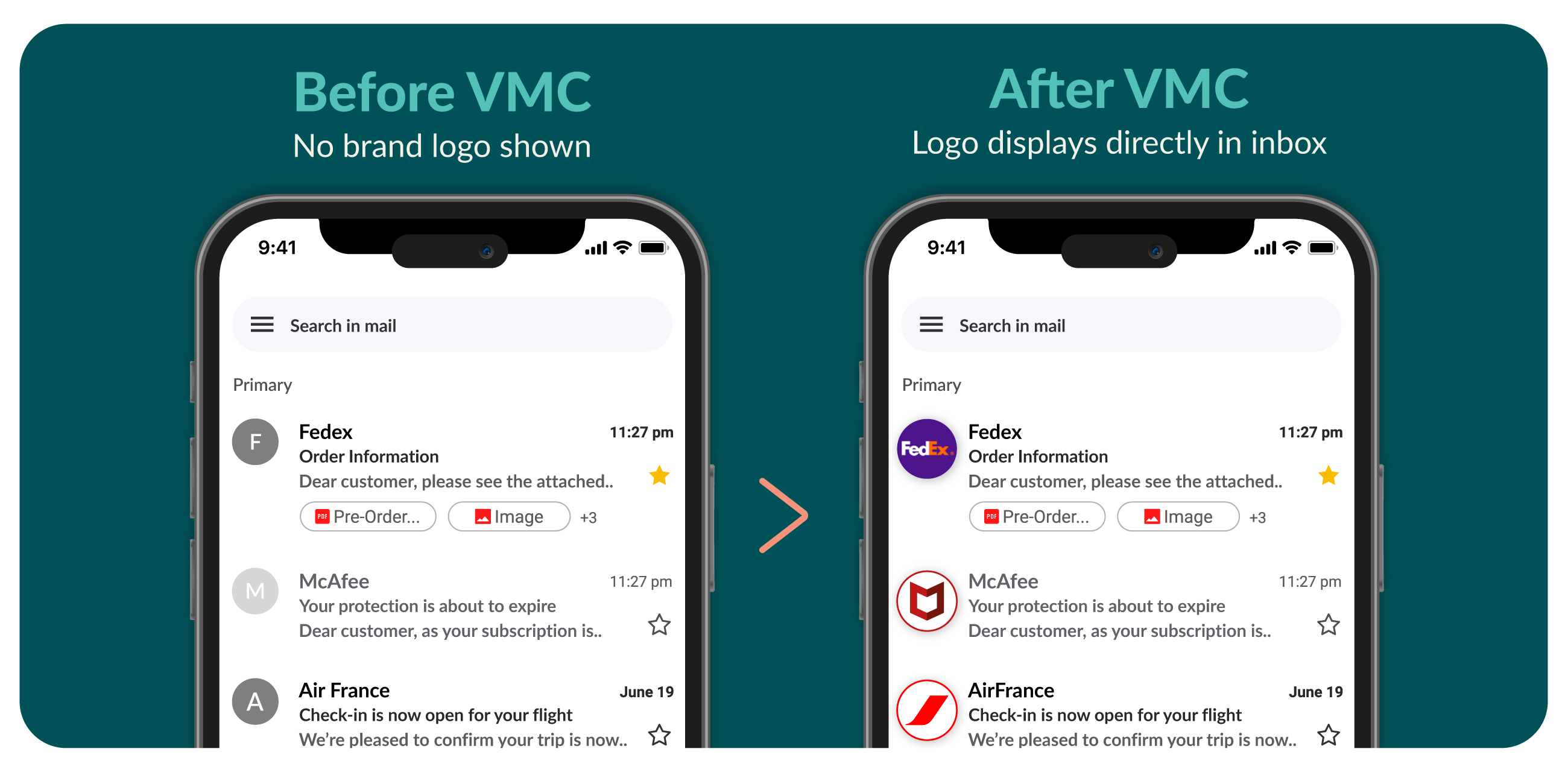
A Verified Mark Certificate (VMC) is what verifies your logo for BIMI, so supporting inboxes can display it next to your emails, as shown below
Before setting up BIMI, your domain needs SPF, DKIM, and an enforced DMARC policy (p=quarantine or p=reject), plus a correctly formatted SVG logo. Inbox providers like Gmail also require a mark certificate (VMC or CMC) before they will display your logo.
Here is the full checklist:
- Email authentication. SPF, DKIM, and DMARC must all be in place and aligned. Your DMARC policy must be set to quarantine or reject. A policy of p=none does not qualify.
- A BIMI-ready logo. Your logo must be in SVG Tiny Portable/Secure format. See the logo format answer below.
- A hosted logo file. Host the SVG at a publicly accessible HTTPS URL, or let Sectigo host it for you.
- A mark certificate. Gmail requires a Verified Mark Certificate (VMC) or Common Mark Certificate (CMC) to display your logo. A VMC requires a registered trademark. A CMC requires a logo that has been in public use for at least 12 months.
- Business verification. Your certificate authority validates your organization’s identity, which may include reviewing registration documents and confirming identity via a notarized ID or video call.
- A BIMI DNS record. Publish a TXT record at default._bimi.yourdomain.com that points to your logo and certificate: v=BIMI1; l=https://yourdomain.com/logo.svg; a=https://yourdomain.com/vmc.pem;
Not sure where your domain stands? Check your domain with Sectigo’s BIMI & DMARC checker above.)
Yes. BIMI requires your logo in SVG Tiny Portable/Secure (SVG Tiny PS) format, a stricter version of SVG built for safe display in email clients. Standard SVG, PNG, and JPG files won’t work.
Your logo file must be:
- In SVG Tiny Portable/Secure (SVG Tiny 1.2) format
- Square, with a minimum of 96 × 96 pixels
- 24 KB or smaller
- Centered on a solid color background, since transparent backgrounds may not display as expected
- Free of scripts, external links, embedded fonts, and raster images
- Specified with fixed dimensions, not relative ones like width="100%"
- Marked up with a <title> tag containing your company name
- Hosted on a secure HTTPS server
To convert an existing logo, you can use the BIMI Group’s SVG conversion tools or edit the file manually in a text editor. Most design software doesn’t export SVG Tiny PS directly, so check your file with a BIMI validator before you publish your record.
A Verified Mark Certificate (VMC) and a Common Mark Certificate (CMC) are digital certificates that verify your organization’s right to display its logo in email inboxes that support BIMI. A VMC verifies a registered trademark logo. A CMC verifies a logo with at least 12 months of public use, without requiring a trademark.
The main difference between a VMC and a CMC is trademark ownership. A VMC requires a registered trademark and offers the highest level of brand verification, including eligibility for the Gmail blue checkmark. A CMC does not require a trademark and allows organizations with established, publicly used logos to participate in BIMI. While VMCs are often chosen by larger enterprises, CMCs offer a faster and more cost-effective option for businesses looking to display their logo in supported inboxes.
Both certificates are valid for one year and must be revalidated and reissued annually. Logo display also depends on whether the recipient’s email provider supports BIMI.
What’s next after my domain passes validation?
If our tool confirms that your BIMI record, DMARC policy, logo, and mark certificate are all properly configured, no further setup should be required. From there, allow time for any DNS changes to propagate and for supporting mailbox providers to begin displaying your company logo next to your emails.
If the tool indicates that you still need a Verified Mark Certificate or Common Mark Certificate, Sectigo is a trusted provider that can help you obtain the certificate required to complete your BIMI setup.