
What is code signing? How it works and why it matters
Code signing is the process of digitally signing software with a certificate issued by a trusted Certificate Authority (CA). The signature shows who published the code and that it hasn’t changed since it was signed, so operating systems and users can check it before they install or run it.
Ready to buy? Compare Sectigo EV and OV code signing certificates

What is code signing?
Code signing uses public key infrastructure (PKI) to tie a piece of software to a verified publisher. Developers sign applications, executables, drivers and scripts before release. When someone downloads or runs the software, the operating system checks the signature to confirm two things: the publisher is who they claim to be, and the code is exactly what was signed.
The signature itself is a digital signature. The signing tool creates a cryptographic hash (a unique fingerprint) of the software and signs it with the publisher’s private key. Anyone can then verify it with the matching public key in the publisher’s certificate. If even one byte changes after signing, verification fails.
What is a code signing certificate?
A code signing certificate is a digital certificate that binds a verified organization to the key pair used to sign software. It follows the X.509 certificate standard and is issued by a CA only after the CA has validated the publisher’s identity.
Once issued, developers use it to sign applications, installers, scripts and updates. Properly signed software shows a verified publisher name, produces fewer operating system warnings, and is harder to alter without detection.
How code signing works
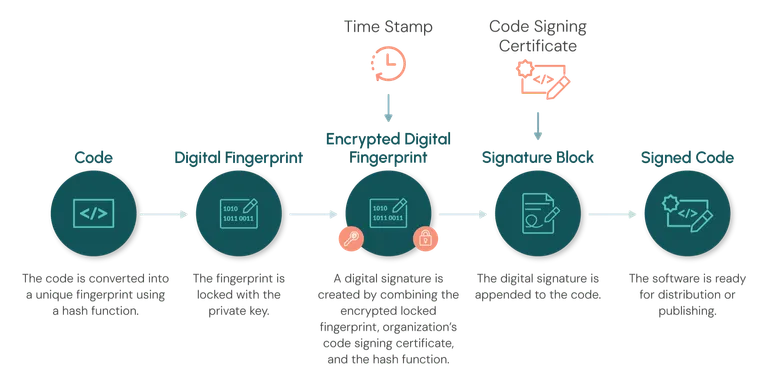
The code signing process follows a series of steps that transform software into a securely signed and verifiable software package:
- The software is hashed. A hash function produces a unique fingerprint of the exact code being released.
- The hash is signed. The developer signs the fingerprint with the private key tied to their code signing certificate.
- A timestamp is added. A trusted timestamp server records when the code was signed, so the signature stays valid even after the certificate expires.
- The signature block is assembled. The signed hash, the certificate and the hashing details are combined into a signature block.
- The signature is attached. The signature block is embedded in the application or executable, ready for distribution.
- The operating system verifies it. On download or install, the system checks the signature. If it’s missing, invalid or untrusted, the user may see a warning or the installation may be blocked.
OV vs EV code signing certificates
Sectigo offers two types of code signing certificates. Both verify your organization. They differ mainly in how deep the vetting goes.
- OV code signing certificate (Organization Validation): the CA verifies your organization’s legal existence, your domain-based email and an authorized contact. It is a cost-effective fit for internal applications, B2B software and general distribution.
- EV code signing certificate (Extended Validation): the CA runs a stricter, extended verification before issuance, which makes it harder for fraudulent organizations to obtain one. It is the usual choice for software distributed to large public audiences.
Two points that older articles often get wrong:
- Key storage is now the same. Private keys for both OV and EV certificates must be generated and stored in FIPS-compliant hardware, such as a hardware token or a hardware security module (HSM). Older guidance saying OV keys can live in software or on the filesystem no longer applies.
- Neither type gives instant SmartScreen reputation. Since 2024, Microsoft SmartScreen builds reputation for OV- and EV-signed files in the same way, over time. EV remains valuable for its stronger identity checks, not as a way to skip warnings.
Code signing certificate requirements in 2026
Industry rules from the CA/Browser Forum changed how code signing certificates are issued and renewed:
- Maximum validity is 459 days (about 15 months) for certificates issued from February 23, 2026.
- Multi-year plans renew every year. A multi-year purchase no longer produces one long-lived certificate. With Sectigo, you receive a new certificate and a new FIPS-compliant hardware token each year of your plan.
- Private keys must stay in FIPS-compliant hardware for both OV and EV: a token or your own supported HSM.
- Timestamping matters more than ever. With shorter lifetimes, a trusted timestamp is what keeps already-signed software valid after its certificate expires.
For teams signing at scale, shorter lifetimes mean more renewals and more keys to protect. For the full details and timeline, see the updated code signing regulations.
Why is code signing important?
Operating systems check software before they let it run. If a program is unsigned or comes from an unknown publisher, users may see warnings that it can’t be verified. The program may still install, but the warnings erode confidence and lead people to abandon downloads.
A trusted signature changes that. It shows a verified publisher name, lets users and systems detect tampering, and helps new software earn reputation as more people download it. Reputation takes time to build, so sign every release with the same signing identity.
Code signing also protects your release pipeline. Organizations typically keep signing keys in secure vaults or HSMs so that attackers can’t use them to sign malicious code or inject it into a build. For practical guidance, read our code signing best practices.
Use cases
Code signing protects software wherever updates and downloads reach users. Operating systems and app marketplaces rely on signatures to confirm that updates come from legitimate publishers and haven’t been altered. This matters most where users don’t approve each installation, including IoT devices, embedded systems and smart devices that update automatically. Only trusted, signed software should be able to run on them.
Code signing in DevOps
Release cycles keep getting faster, and manual signing steps, hardware handling and disconnected workflows can slow pipelines down. Modern teams need signing built into automated build and release processes. Standards such as the ACME protocol and platforms like Sectigo Certificate Manager help bring certificate management and signing into DevOps tooling such as Kubernetes, Ansible, Terraform and Docker, so integrity checks don’t slow releases down.
FAQ
Is code signing required?
Code signing isn’t legally required for most software, but many platforms effectively require it. Windows warns users about unsigned or unrecognized software, Windows kernel-mode drivers must go through Microsoft signing, and Apple platforms and most app stores require signed apps. Signing every release also protects your customers from tampered downloads.
What happens when a code signing certificate expires?
Software signed with a trusted timestamp stays valid after the certificate expires, because the timestamp proves it was signed while the certificate was valid. Without a timestamp, signatures can fail validation once the certificate expires. You need a new, unexpired certificate to sign new releases.
Does code signing remove SmartScreen warnings?
Not on its own. A valid signature shows your verified publisher name, but Microsoft SmartScreen also checks the reputation of the signing identity and the file, so new releases can still show a warning. Reputation builds as people download your signed software. Using the same signing identity for every release helps.
Deliver trusted software with code signing
Code signing helps organizations protect software integrity, reduce operating system security warnings, and ensure applications are recognized as coming from a verified publisher.
With Sectigo Code Signing certificates, teams can improve install trust, streamline signing workflows, and protect every build from unauthorized tampering while keeping releases fast and user confidence high.