






CMC Certificates
Display your logo in emails with no trademark needed
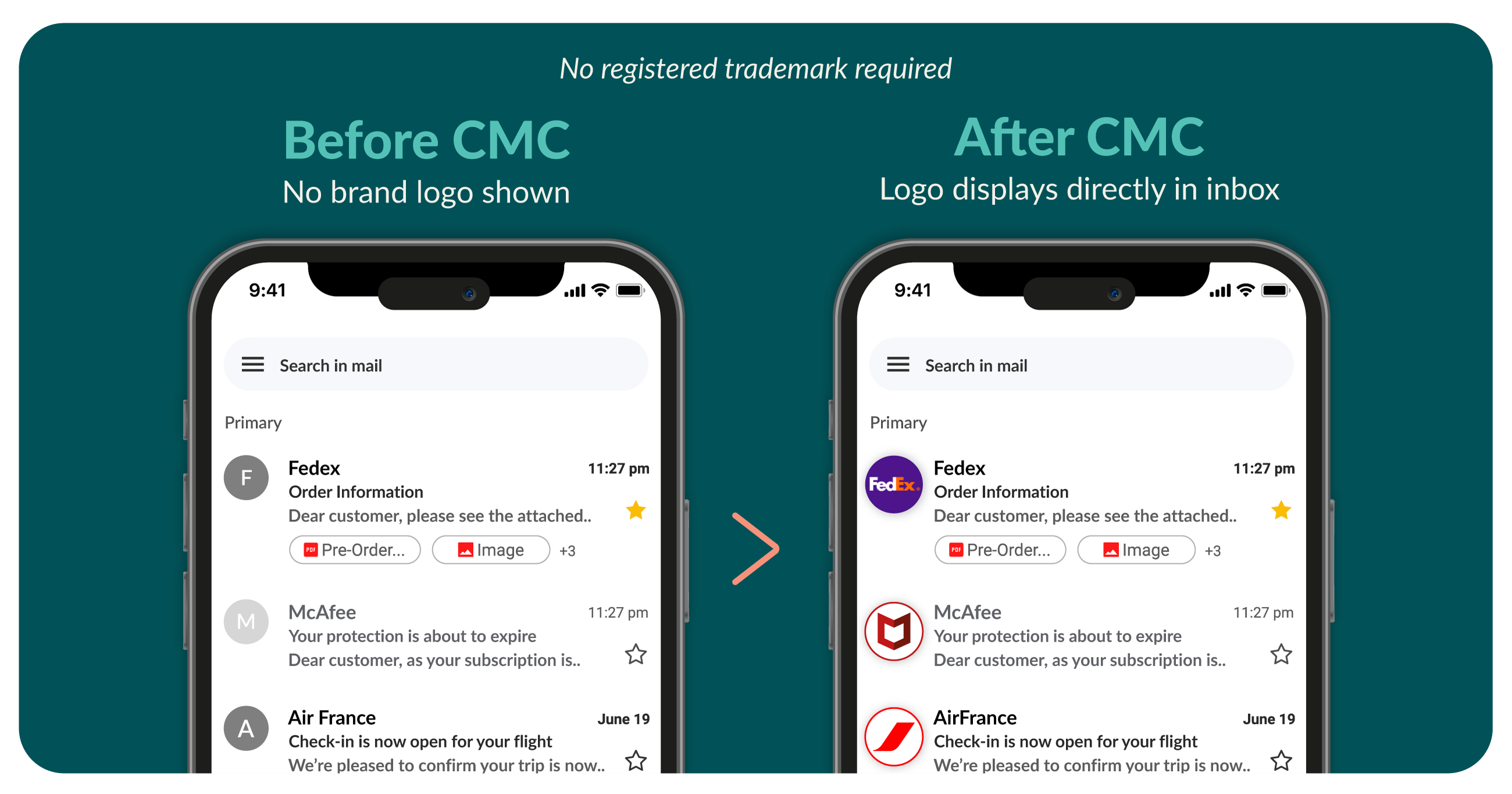
Common Mark Certificates (CMCs) are designed to verify brand logos for display in email inboxes without the need for a registered trademark. They offer a faster and more accessible path to BIMI (Brand Indicators for Message Identification) compliance, making them ideal for growing brands looking to boost email engagement, visibility, and trust. Studies show brand logos visible in inboxes lead to:
- 21% increase in open rates
- 18% improvement in brand recall
- 34% increase in purchase likelihood
Verified Mark Certificates (VMCs) and CMCs share a common goal of improving trust and credibility through the use of verified brand logos. However, CMCs provide greater flexibility for small to midsize businesses by eliminating the requirement for a registered trademark. They help restore trust at the inbox, increase deliverability, and protect against spoofing and phishing attacks, benefits that can lead to improved engagement metrics like open rates. CMCs are easy to implement and can typically be issued within five to ten days.
VMC vs CMC: Find the Right Email Branding Certificate for Your Business
Your choice of certificate determines how your brand appears in inboxes, the trust you build with customers, and how quickly you can go live.
Verified Mark Certificate (VMC)

Choose VMC if:
- You have a registered trademark
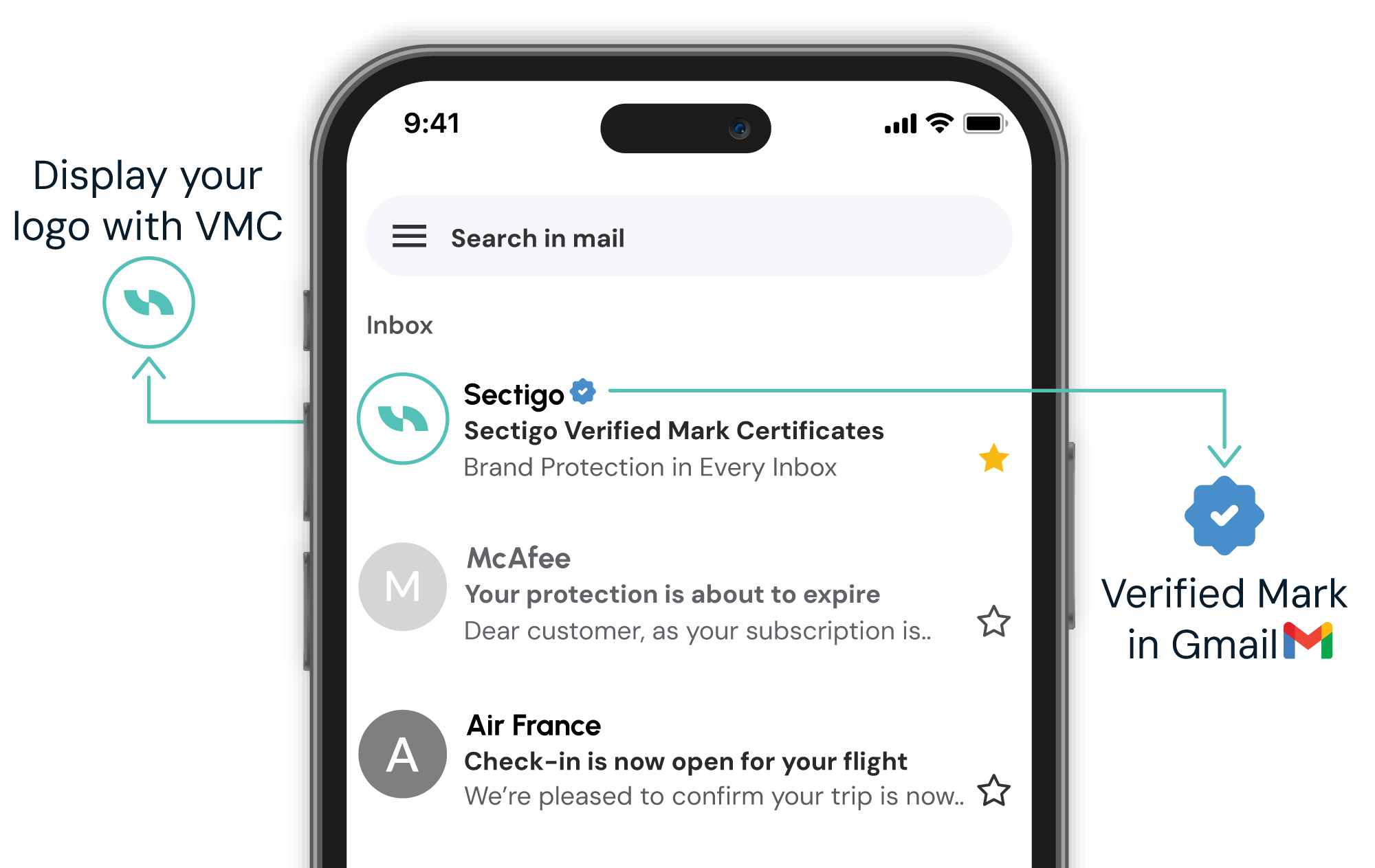
- You need the blue verified checkmark in Gmail
- Maximum email trust is critical (full BIMI compliance)
- Brand protection is paramount
- You can invest in premium certification (as low as $1,350/year)
- Best for large enterprises, regulated industries
Common Mark Certificate (CMC)

Choose CMC if:
- You don't have a registered trademark
- Your logo has 12+ months of public use
- Basic email branding is sufficient (basic BIMI compliance)
- Faster deployment is needed (issued in 5-10 days)
- You want cost-effective branding (as low as $990/year)
- Best for SMBs, startups, unregistered brand logos
Features & Benefits of Common Mark Certificates
| No registered trademark required | Registered trademarks are valuable but can be difficult and time consuming to obtain. CMCs offer a middle ground: the benefits of visual inbox trust and BIMI compliance without the wait for a registered trademark. To qualify, your logo must be in long-term use (typically more than one year), but issuance is fast, often within five to ten days. | |
|---|---|---|
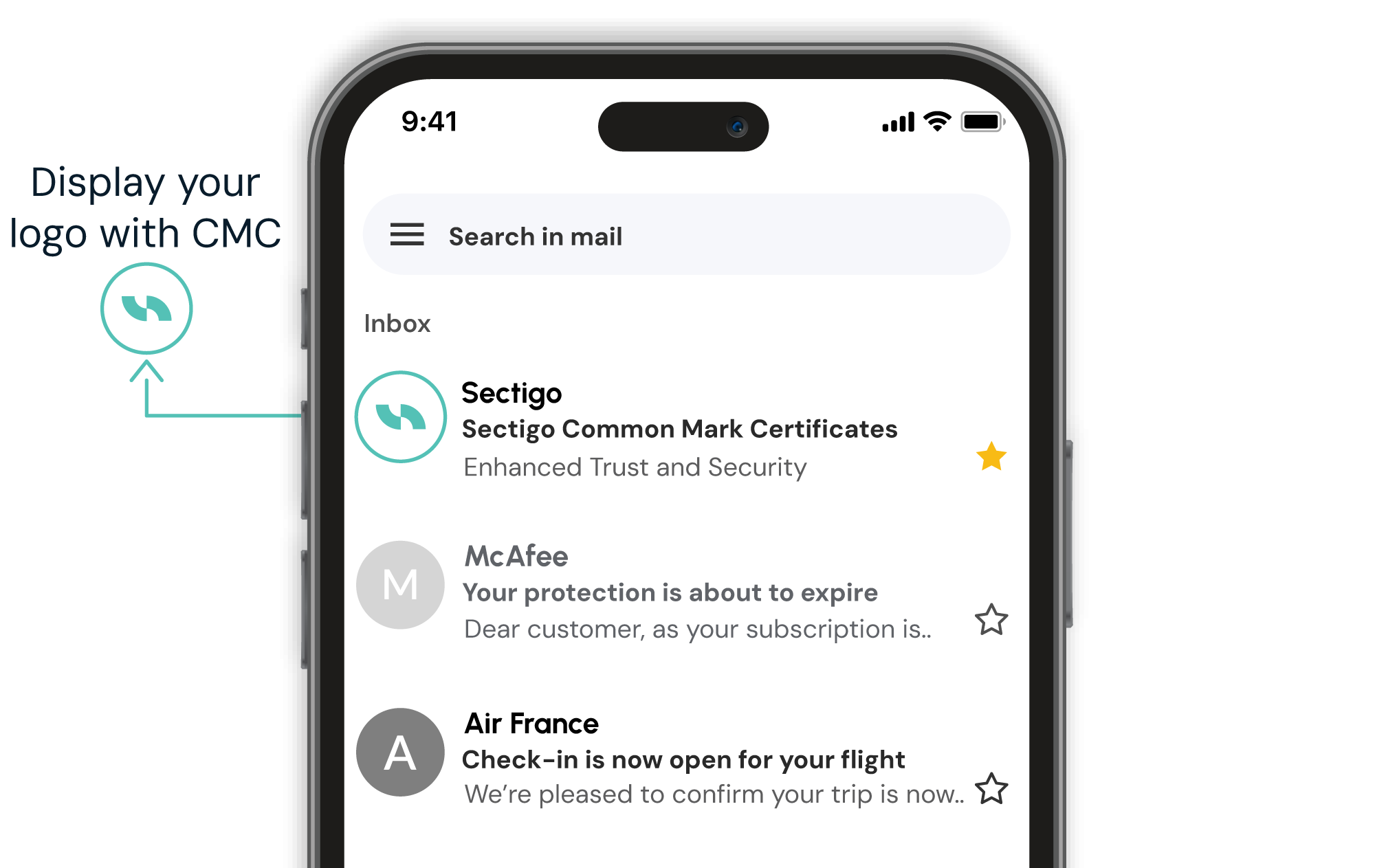
| Enables brand logo visibility in inboxes | CMCs place recognizable logos next to senders' names, rendering emails instantly identifiable. This addresses one of the key obstacles in modern email marketing: a general lack of trust among email recipients. Emails marked by recognizable logos signal visual trust, indicating that emails are safe to open. | |
| Compatible with BIMI-supported clients | CMCs are recognized by major email providers like Gmail and Yahoo, offering seamless compatibility across platforms that support BIMI logo display. |
| Protect against phishing and spoofing attacks | Phishing and spoofing attacks are on the rise, with many cybercriminals successfully impersonating legitimate brands. CMCs make these attacks more difficult to execute by attaching authenticated logos that immediately distinguish legitimate email communication from fraudulent messages. |
|---|---|
| Increase brand engagement | Emails displaying logos signal visual trust, leading to increased engagement. A recent study found that displaying brand logos in email inboxes leads to a 21% increase in open rates, a 18% improvement in brand recall, and a 34% increase in purchase likelihood. |
| More affordable than VMCs | While VMCs offer exceptional branding and protection for enterprises, they can feel financially out of reach for some businesses. CMCs offer a more affordable, yet highly effective alternative from small to mid-sized businesses. |
Requirements for getting a Common Mark Certificate
DMARC compliance: DMARC (Domain-based Message Authentication, Reporting, and Conformance) must be correctly implemented with a policy of quarantine or reject published in DNS. This is required to prevent phishing and spoofing and is essential for BIMI compliance.
A domain with email authentication: Your sending domain must have SPF (Sender Policy Framework) and DKIM (DomainKeys Identified Mail) set up correctly.
An official logo in SVG format: Your brand logo must be in SVG Tiny 1.2 format and should include an embedded color profile. The logo must be in public use on your domain for 12+ months.
Business verification: Sectigo will verify your business identity by reviewing your registration and legal documentation to ensure the organization is legitimate and authorized to use the brand logo.
How to set up and activate your CMC
You've acquired all the CMC essentials, and now, it's time to set up and activate this valuable certificate. Follow these steps to get started:
- Configure email security
- DMARC policy must be enforced at p=quarantine or p=reject. SPF and DKIM must also be properly configured.
- Purchase your Common Mark Certificate
- Buy your CMC using the “Add to Cart” button above.
- Complete your CMC setup
- You will receive an email with instructions to help you provide your organization's details and download your certificate. Sectigo will verify your business identity, which may include reviewing registration documents and confirming identity via a notarized ID or video call.
- Set up your logo
- Allow Sectigo to host your logo file, or upload it to a publicly accessible HTTPS URL. The logo must be in public use for at least 12 months.
- If you're hosting your own logo, add a BIMI TXT record to your domain's DNS (your host or IT team can assist)
- Publish your BIMI record
- Add a BIMI TXT record to your domain’s DNS. Your IT team or provider can assist.
- Test and maintain
- Use a BIMI tool to verify setup. Logo should display in supported inboxes when you send a test email. Note: CMCs do not trigger Gmail’s blue verified checkmark. Monitor your DMARC policy and renew your CMC to maintain logo visibility.
FAQs
Have another question?
Reach us by chat in the lower-right corner.
When recipients see familiar brand logos, they are more likely to feel confident that emails have been sent by reputable sources. VMCs facilitate logos, which offer a powerful form of visual reassurance. This makes recipients more likely to open and read emails. Furthermore, the DMARC process required to use VMCs can improve engagement by emphasizing authentication, which improves deliverability. Google also shows a blue checkmark indicating the sender of this email has verified that they own the domain and the logo in the profile image.
BIMI (Brand Indicators for Message Identification) is an email authentication standard that displays a brand’s logo in supported email clients. For Gmail users, Google displays a blue checkmark next to the sender’s name to indicate a verified logo. A VMC (Verified Mark Certificate) is a digital certificate issued by a trusted authority that verifies logo ownership, often required for BIMI implementation. CMC (Certified Mark Certificate) shares a common goal of verifying logo ownership but does not require a registered trademark. CMCs are often a faster and more accessible path to BIMI compliance, however they do not trigger the Gmail blue checkmark.
BIMI works in conjunction with email authentication protocols like SPF, DKIM and DMARC to make the sender’s worthiness more visible in recipients’ inboxes. SPF (Sender Policy Framework) prevents email spoofing by allowing domain owners to specify which mail servers are authorized to send emails on behalf of their domain. DKIM (DomainKeys Identified Mail) adds a security layer by allowing the sender to attach a digital signature to the email to confirm the sender's identity and to verify the content has not been altered in transit. DMARC (Domain-based Message Authentication Reporting & Conformance) builds on SPF and DKIM by providing a policy framework that tells receiving mail servers how to handle emails that fail SPF or DKIM checks. It also allows domain owners to receive reports on email authentication results.
BIMI works by linking your email address to your brand’s logo using DNS records. To become BIMI compliant, companies must ensure that their emails are authenticated using SPF, DKIM and DMARC, then set up a DNS record that points to their logo image and VMC. BIMI-participating mailbox providers like Gmail, Apple Mail and Yahoo check the BIMI record when receiving emails from the company’s email domain. If DMARC passes, it will verify if there is a BIMI record in DNS for the sender domain name (and so be re-directed to the VMC and logo image to display); if DMARC fails, it won’t look for BIMI.
VMC logos are currently supported in inboxes of email clients that implement BIMI — including Gmail, Yahoo Mail, Apple Mail, Zoho Mail, Fastmail, La Poste, Onet.pl, Zoner, and au.com. Gmail also displays a blue checkmark for verified senders with VMC. An updated list of mailbox providers is maintained by the BIMI group.
To create a BIMI record, follow these steps:
- Ensure DMARC enforcement: Your domain must have a DMARC policy set to p=quarantine or p=reject.
- Prepare your logo: Convert your logo to SVG format using the SVG Tiny Portable/Secure (SVG P/S) profile.
- Host your logo: Upload the SVG file to a secure HTTPS-accessible location.
- Obtain a Verified Mark Certificate (VMC): If required by your target email providers (e.g., Gmail), get a VMC from a trusted Certificate Authority like DigiCert or Entrust.
- Publish the BIMI record: Add a DNS TXT record for default._bimi.yourdomain.com with the following format:
v=BIMI1; l=https://yourdomain.com/logo.svg; a=https://yourdomain.com/vmc.pem;
If you're not using a VMC, leave the a= field blank for a self-asserted record.
If you are unsure how to add a TXT record to your DNS, check with your hosting provider, DNS provider or system administrator.
Typically an organization's legal team can provide details around your trademark status. Having this data, you can look on the World Intellectual Property Organization's (WIPO) website and search for your organization's logo. Once you find your logo in the database, verify registration status (trademark must not expire within 397 days of verification), jurisdiction and a match between the logo you use in email and the trademarked version. As of September 2025, VMC guidelines officially recognize 17 intellectual property offices:
- United States Patent and Trademark Office
- Canadian Intellectual Property Office
- European Union Intellectual Property Office
- UK Intellectual Property Office
- Deutsches Patent- und Markenamt
- Japan Trademark Office
- Spanish Patent and Trademark Office O.A.
- IP Australia
- Intellectual Property India
- Korean Intellectual Property Office
- Instituto Nacional da Propriedade Industrial
- French Institut National de la Propriete Industrielle
- Benelux Office for Intellectual Property
- Denmark Ministry of Culture
- Swedish Intellectual Property Office
- Swiss Federal Institute of Intellectual Property
- Intellectual Property Office of New Zealand
If your logo is not registered with a recognized intellectual property office, you need to go through the trademark registration process in the appropriate jurisdiction. This process can take months, so plan ahead. Alternatively, if your organization is unable to register their logo, or is looking for a more accessible path to BIMI compliance, you may want to start with a Common Mark Certificate (CMC) which allows your organization to display your logo in emails without a trademark.
Applicants can demonstrate historical usage by providing proof that the logo has been used on their website for at least 12 months. Proof of this activity can be found on the Internet Archive: https://archive.org
VMC/CMC validation consists of:
- Organization validation (similar to EV SSL)
- Face-to-face validation (similar to eIDAS)
- Logo verification
- Domain Control Validation (same as for SSL)
- CAA checks (same as for SSL)
Mark Certificates are valid for one year. Sectigo offers its customers multi-year subscriptions on Mark Certificates, which ensure continuous coverage and cost-saving benefits.
If your organization has one domain and one logo, you may only need one VMC/CMC. If you have multiple domains and a single logo, you can use one VMC/CMC for all domains. If you have multiple logos you wish to display in recipient’s inboxes, you need one certificate per unique logo.
Before starting the setup process, we recommend having the following information ready. This will help you move through the setup smoothly without losing progress.
- Domain names you want to associate with your CMC/ VMC
- Certificate Signing Request (CSR)
- Must include all domains you’re associating now
- Cannot include more domains than purchased
- You can start with one domain and add more later
- Domain validation method for each domain (Email, DNS, or HTTP)
- Organization details: legal name, registration number, and address
- Validation contact information
- Trademark details: registration number, jurisdiction, and DUNS number
- View list of verified trademark offices for VMC (Not needed for CMC)
- Logo in SVG format
- Max size: 24 KB
- Must meet CMC/ VMC logo requirements (square aspect ratio, no transparency)
You can absolutely host your own logo. Your logo must be publicly accessible via HTTPS. That is, you should upload your logo to a location that is accessible on the internet. Simply upload your SVG file to your server and reference its URL in your BIMI DNS record. Make sure the file meets BIMI specifications and is not behind authentication or redirects. If you prefer, you can let Sectigo host your logo file instead.
Your logo must be:
- In SVG Tiny Portable/Secure (SVG Tiny 1.2) format.
- Square aspect ratio (e.g., 600x600 pixels).
- Under 24 KB in file size.
- Free of scripts, external links, embedded fonts, or raster images.
- Include a <title> tag with your company name.
- Hosted on a secure HTTPS server.
You can use tools provided by the BIMI Group or manually edit the SVG file using a text editor to ensure compliance.
Why choose Sectigo?
The Market Leader
Sectigo is the market leader in SSL/TLS certificates, DevOps, IoT, enterprise-grade public key infrastructure (PKI) management, and multi-layered web security.
Over 700,000 Customers
Businesses worldwide rely on Sectigo for solutions ranging from SSL certificates to our award winning certificate management platform, Sectigo Certificate Manager.
Security at scale
Sectigo has issued over 1 billion certificates and currently secures more than 57 million active certificates, ensuring trust and security worldwide.
24/7 Full Service Support
Offering customers 24/7 support and a money-back guarantee, Sectigo is the obvious choice for best-in-class customer service.
Improve inbox credibility with common mark certificates from Sectigo
Help your brand stand out in supported inboxes and build instant recognition and trust with a Sectigo CMC.
Trusted by Leading Brands Globally
Securing some of the world’s largest and best-known brands.
Need help?
Need help making a purchase? Contact us today to get your certificate issued right away.