VMC vs CMC : trouvez le certificat de marque électronique adapté à votre entreprise
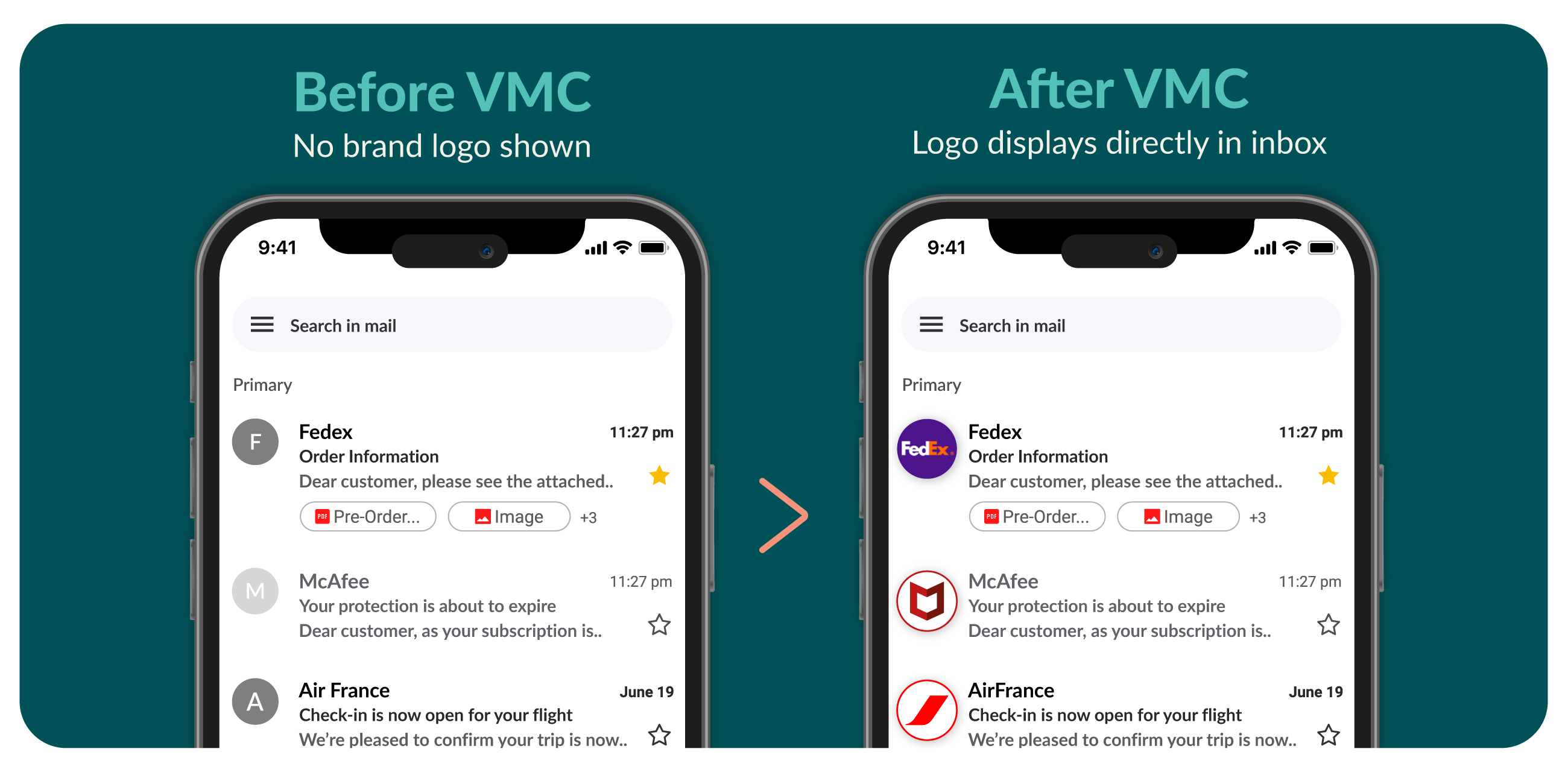
Votre choix de certificat détermine la façon dont votre marque apparaît dans les boîtes de réception, la confiance que vous établissez avec vos clients et la rapidité avec laquelle vous pouvez être opérationnel.
Certificat de marque vérifiée (VMC)

Choisissez le VMC si :
- Vous disposez d'une marque déposée
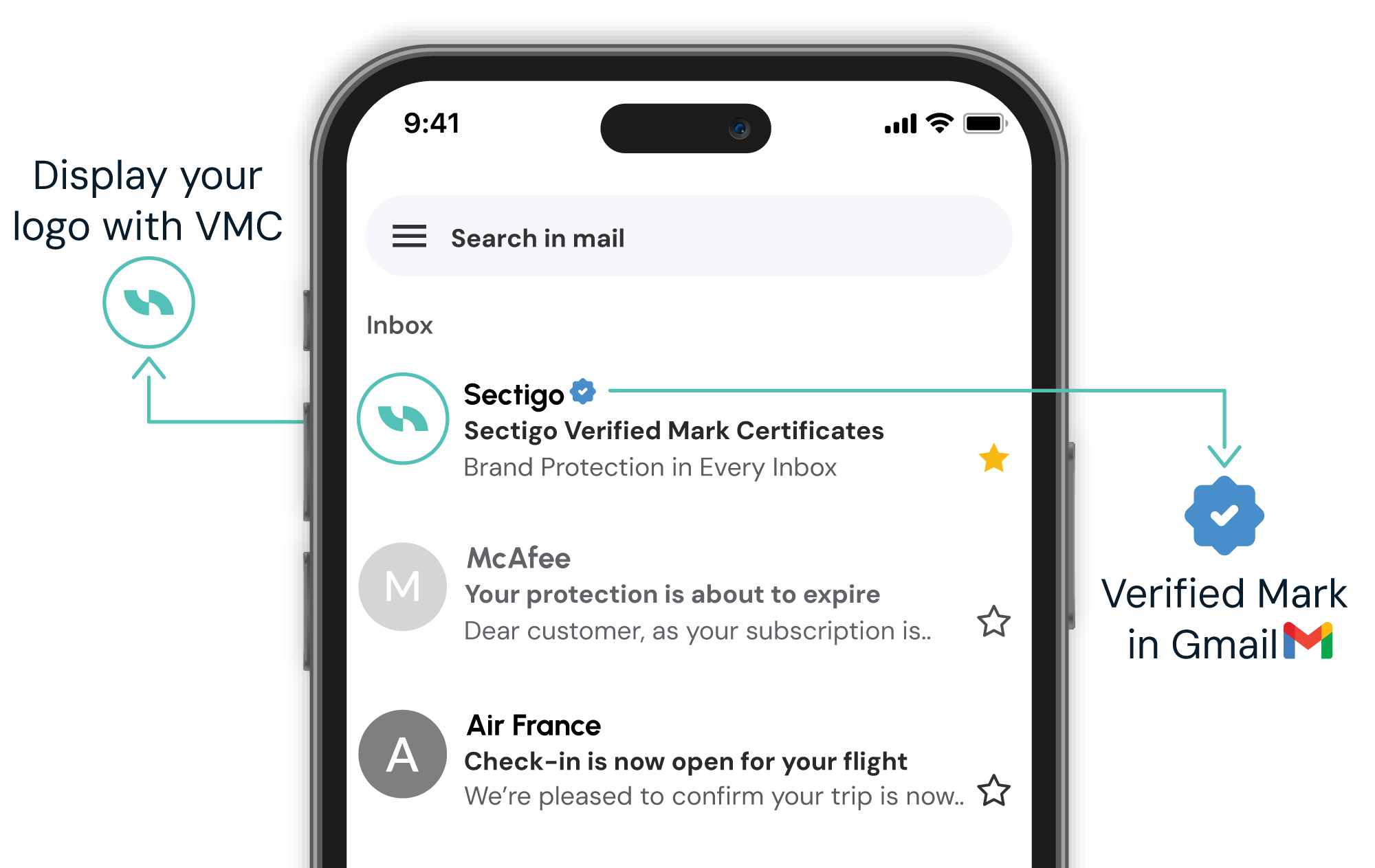
- Vous avez besoin de la coche bleue de vérification dans Gmail
- Une confiance maximale dans les e-mails est essentielle (conformité BIMI totale)
- La protection de la marque est primordiale
- Vous pouvez investir dans une certification premium (à partir de 1 350 $/an)
- Idéal pour les grandes entreprises et les secteurs réglementés
Certificat de marque commune (CMC)

Choisissez le CMC si :
- Vous n'avez pas de marque déposée
- Votre logo est utilisé publiquement depuis plus de 12 mois
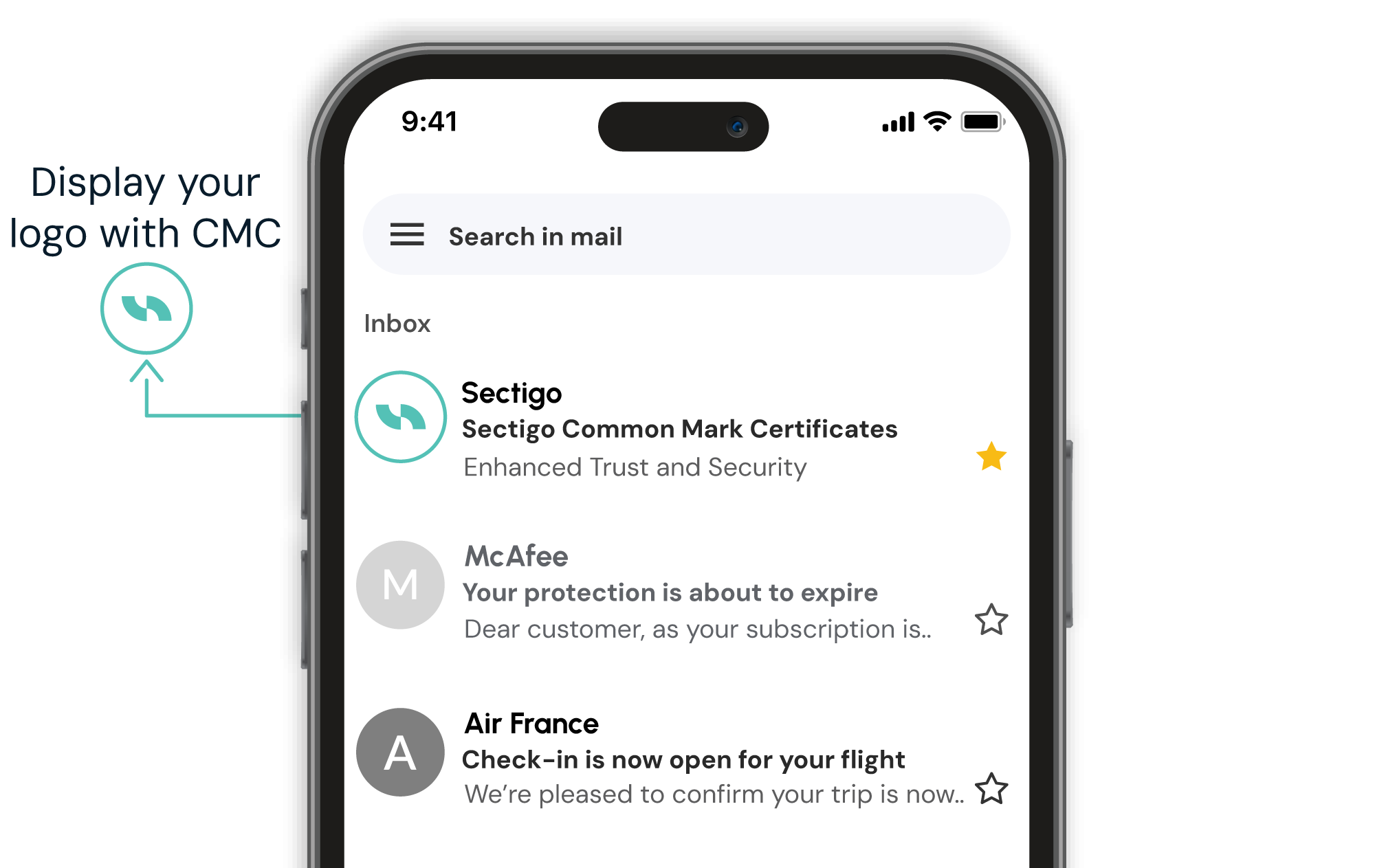
- Une image de marque basique par e-mail est suffisante (conformité BIMI basique)
- Un déploiement plus rapide est nécessaire (délivré en 5 à 10 jours)
- Vous souhaitez une image de marque rentable (à partir de 990 $/an)
- Idéal pour les PME, les start-ups et les logos de marques non déposées
Caractéristiques et avantages
| Empêchez le phishing | Les certificats Mark placent votre logo vérifié directement dans la boîte de réception des destinataires, ce qui permet à vos e-mails de se démarquer comme étant fiables et facilite la détection des usurpateurs. Éliminez les doutes, protégez votre réputation et convertissez en toute confiance. |
| Améliorer la délivrabilité | Les certificats Mark ne se contentent pas de sécuriser vos e-mails, ils améliorent également leur délivrabilité et leur visibilité en vérifiant que votre domaine respecte les normes d'authentification les plus strictes, notamment DMARC, SPF et DKIM. Ainsi, davantage d'e-mails parviennent à leurs destinataires, c'est-à-dire vos clients. |
| Démarquez-vous. Restez en sécurité. | Les certificats Mark étendent votre identité visuelle à la boîte de réception, renforçant ainsi la reconnaissance de votre marque et la confiance dans l'un des espaces numériques les plus encombrés. En même temps, ils valident vos normes d'authentification des e-mails, renforçant ainsi la sécurité, la délivrabilité et la protection de votre marque à chaque envoi. |
| Obtenez de meilleurs résultats | Emails with verified logos are more likely to be opened and read. A clear visual cue builds confidence with your audience, helping improve open rates and conversion over time. |
Ce dont vous avez besoin pour commander un VMC
- Sécurisez votre domaine de messagerie avec DMARC
DMARC est une politique de sécurité qui empêche les pirates d'envoyer de faux e-mails en utilisant votre domaine. L'authentification DMARC est nécessaire pour répondre aux spécifications BIMI.- Votre politique DMARC doit être définie sur « quarantaine » ou « rejeter (p=quarantaine ou p=rejeter) ».
- SPF (Sender Policy Framework) et DKIM (DomainKeys Identified Mail) doivent être correctement configurés.
- Votre domaine doit respecter les règles DMARC pendant au moins 30 jours avant de demander un VMC.
- Disposez d'un logo déposé - Votre logo doit être officiellement enregistré dans une base de données de marques déposées reconnue (par exemple, l'USPTO aux États-Unis).
- Le logo doit être au format SVG carré pour répondre aux exigences BIMI.
- Vérifiez l'identité de votre entreprise
- Nous vérifierons l'enregistrement de votre entreprise et vos documents juridiques.
- Ce processus de validation garantit que seules les entreprises légitimes peuvent afficher leur logo dans les boîtes de réception des e-mails.
Comment commander votre certificat de marque vérifiée (VMC)
Pour commander et obtenir votre VMC, suivez ces six étapes :
- Vérifiez la sécurité de votre messagerie électronique (configuration DMARC)
Avant de postuler, votre domaine de messagerie électronique doit être protégé par la sécurité DMARC :- Définissez votre politique DMARC sur « quarantaine » ou « rejet » (et non « aucune »).
- Assurez-vous que SPF et DKIM sont correctement configurés.
- Laissez DMARC actif pendant au moins 30 jours avant de passer commande.
- Confirmez que votre logo est une marque déposée
- Votre logo doit être officiellement enregistré auprès d'un bureau des marques reconnu.
- Il doit être au format SVG carré (requis pour la conformité BIMI).
- Achetez votre VMC
- Ajoutez-le à votre panier ci-dessus et finalisez votre achat.
- Vous recevrez un e-mail contenant des instructions pour vous aider à finaliser et télécharger votre VMC.
- Sectigo vérifiera l'identité de votre entreprise, ce qui peut inclure l'examen des documents d'enregistrement et la confirmation de l'identité via une pièce d'identité certifiée conforme ou un appel vidéo.
- Configurez votre logo
- Téléchargez votre logo SVG sur une URL HTTPS accessible au public ou autorisez Sectigo à héberger votre logo pour vous.
- Si vous hébergez votre propre logo, ajoutez un enregistrement BIMI TXT au DNS de votre domaine (votre hébergeur ou votre équipe informatique peut vous aider).
- Vérifiez et testez votre logo
- Utilisez un outil de test BIMI pour vérifier si votre e-mail est correctement configuré.
- Envoyez un e-mail de test pour vous assurer que votre logo vérifié apparaît dans les boîtes de réception.
- Maintenez votre VMC active
- Surveillez régulièrement la conformité DMARC pour éviter tout problème.
- Renouvelez votre VMC avant son expiration pour conserver votre visibilité.
Donnez de la crédibilité à vos e-mails grâce à un certificat de marque vérifiée de Sectigo
Une VMC ajoute de la crédibilité là où cela compte le plus : dans la boîte de réception. Elle prouve que vos e-mails proviennent d'une source vérifiée et affiche votre logo dans les clients pris en charge tels que Gmail.
Commencez avec Sectigo et donnez à vos e-mails la crédibilité qu'ils méritent.
FAQs
Have another question?
Reach us by chat in the lower-right corner.
When recipients see familiar brand logos, they are more likely to feel confident that emails have been sent by reputable sources. VMCs facilitate logos, which offer a powerful form of visual reassurance. This makes recipients more likely to open and read emails. Furthermore, the DMARC process required to use VMCs can improve engagement by emphasizing authentication, which improves deliverability. Google also shows a blue checkmark indicating the sender of this email has verified that they own the domain and the logo in the profile image.
BIMI (Brand Indicators for Message Identification) is an email authentication standard that displays a brand’s logo in supported email clients. For Gmail users, Google displays a blue checkmark next to the sender’s name to indicate a verified logo. A VMC (Verified Mark Certificate) is a digital certificate issued by a trusted authority that verifies logo ownership, often required for BIMI implementation. CMC (Certified Mark Certificate) shares a common goal of verifying logo ownership but does not require a registered trademark. CMCs are often a faster and more accessible path to BIMI compliance, however they do not trigger the Gmail blue checkmark.
BIMI works in conjunction with email authentication protocols like SPF, DKIM and DMARC to make the sender’s worthiness more visible in recipients’ inboxes. SPF (Sender Policy Framework) prevents email spoofing by allowing domain owners to specify which mail servers are authorized to send emails on behalf of their domain. DKIM (DomainKeys Identified Mail) adds a security layer by allowing the sender to attach a digital signature to the email to confirm the sender's identity and to verify the content has not been altered in transit. DMARC (Domain-based Message Authentication Reporting & Conformance) builds on SPF and DKIM by providing a policy framework that tells receiving mail servers how to handle emails that fail SPF or DKIM checks. It also allows domain owners to receive reports on email authentication results.
BIMI works by linking your email address to your brand’s logo using DNS records. To become BIMI compliant, companies must ensure that their emails are authenticated using SPF, DKIM and DMARC, then set up a DNS record that points to their logo image and VMC. BIMI-participating mailbox providers like Gmail, Apple Mail and Yahoo check the BIMI record when receiving emails from the company’s email domain. If DMARC passes, it will verify if there is a BIMI record in DNS for the sender domain name (and so be re-directed to the VMC and logo image to display); if DMARC fails, it won’t look for BIMI.
VMC logos are currently supported in inboxes of email clients that implement BIMI — including Gmail, Yahoo Mail, Apple Mail, Zoho Mail, Fastmail, La Poste, Onet.pl, Zoner, and au.com. Gmail also displays a blue checkmark for verified senders with VMC. An updated list of mailbox providers is maintained by the BIMI group.
To create a BIMI record, follow these steps:
- Ensure DMARC enforcement: Your domain must have a DMARC policy set to p=quarantine or p=reject.
- Prepare your logo: Convert your logo to SVG format using the SVG Tiny Portable/Secure (SVG P/S) profile.
- Host your logo: Upload the SVG file to a secure HTTPS-accessible location.
- Obtain a Verified Mark Certificate (VMC): If required by your target email providers (e.g., Gmail), get a VMC from a trusted Certificate Authority like DigiCert or Entrust.
- Publish the BIMI record: Add a DNS TXT record for default._bimi.yourdomain.com with the following format:
v=BIMI1; l=https://yourdomain.com/logo.svg; a=https://yourdomain.com/vmc.pem;
If you're not using a VMC, leave the a= field blank for a self-asserted record.
If you are unsure how to add a TXT record to your DNS, check with your hosting provider, DNS provider or system administrator.
Typically an organization's legal team can provide details around your trademark status. Having this data, you can look on the World Intellectual Property Organization's (WIPO) website and search for your organization's logo. Once you find your logo in the database, verify registration status (trademark must not expire within 397 days of verification), jurisdiction and a match between the logo you use in email and the trademarked version. As of September 2025, VMC guidelines officially recognize 17 intellectual property offices:
- United States Patent and Trademark Office
- Canadian Intellectual Property Office
- European Union Intellectual Property Office
- UK Intellectual Property Office
- Deutsches Patent- und Markenamt
- Japan Trademark Office
- Spanish Patent and Trademark Office O.A.
- IP Australia
- Intellectual Property India
- Korean Intellectual Property Office
- Instituto Nacional da Propriedade Industrial
- French Institut National de la Propriete Industrielle
- Benelux Office for Intellectual Property
- Denmark Ministry of Culture
- Swedish Intellectual Property Office
- Swiss Federal Institute of Intellectual Property
- Intellectual Property Office of New Zealand
If your logo is not registered with a recognized intellectual property office, you need to go through the trademark registration process in the appropriate jurisdiction. This process can take months, so plan ahead. Alternatively, if your organization is unable to register their logo, or is looking for a more accessible path to BIMI compliance, you may want to start with a Common Mark Certificate (CMC) which allows your organization to display your logo in emails without a trademark.
Applicants can demonstrate historical usage by providing proof that the logo has been used on their website for at least 12 months. Proof of this activity can be found on the Internet Archive: https://archive.org
VMC/CMC validation consists of:
- Organization validation (similar to EV SSL)
- Face-to-face validation (similar to eIDAS)
- Logo verification
- Domain Control Validation (same as for SSL)
- CAA checks (same as for SSL)
Mark Certificates are valid for one year. Sectigo offers its customers multi-year subscriptions on Mark Certificates, which ensure continuous coverage and cost-saving benefits.
If your organization has one domain and one logo, you may only need one VMC/CMC. If you have multiple domains and a single logo, you can use one VMC/CMC for all domains. If you have multiple logos you wish to display in recipient’s inboxes, you need one certificate per unique logo.
Before starting the setup process, we recommend having the following information ready. This will help you move through the setup smoothly without losing progress.
- Domain names you want to associate with your CMC/ VMC
- Certificate Signing Request (CSR)
- Must include all domains you’re associating now
- Cannot include more domains than purchased
- You can start with one domain and add more later
- Domain validation method for each domain (Email, DNS, or HTTP)
- Organization details: legal name, registration number, and address
- Validation contact information
- Trademark details: registration number, jurisdiction, and DUNS number
- View list of verified trademark offices for VMC (Not needed for CMC)
- Logo in SVG format
- Max size: 24 KB
- Must meet CMC/ VMC logo requirements (square aspect ratio, no transparency)
You can absolutely host your own logo. Your logo must be publicly accessible via HTTPS. That is, you should upload your logo to a location that is accessible on the internet. Simply upload your SVG file to your server and reference its URL in your BIMI DNS record. Make sure the file meets BIMI specifications and is not behind authentication or redirects. If you prefer, you can let Sectigo host your logo file instead.
Your logo must be:
- In SVG Tiny Portable/Secure (SVG Tiny 1.2) format.
- Square aspect ratio (e.g., 600x600 pixels).
- Under 24 KB in file size.
- Free of scripts, external links, embedded fonts, or raster images.
- Include a <title> tag with your company name.
- Hosted on a secure HTTPS server.
You can use tools provided by the BIMI Group or manually edit the SVG file using a text editor to ensure compliance.
Approuvé par les plus grandes marques mondiales
Sécurisation de certaines des marques les plus importantes et les plus connues au monde.
Besoin d'aide ?
Besoin d'aide pour effectuer un achat ? Contactez-nous dès aujourd'hui pour que votre certificat soit délivré immédiatement.
Chat en direct
Cliquez sur le bouton ci-dessous ou cliquez sur « Chat avec un expert » pour commencer à chatter avec nous dès maintenant !